Command-Line TTS: Fast, Private Speech
· 12 min read

Tired of the hassle of browser-based text-to-speech (TTS) tools? Command-line tools like TTSBuddy are faster, more efficient, and secure. Here's why you should make the switch:
Tired of the hassle of browser-based text-to-speech (TTS) tools? Command-line tools like TTSBuddy are faster, more efficient, and secure. Here's why you should make the switch:
TTSBuddy CLI is a command-line tool for turning text into MP3 audio from your terminal. It works with inline text, local files, Markdown notes, stdin, pipes, and automation scripts.
The CLI is built for people who want audio without opening the web dashboard: students turning notes into study audio, developers wiring TTS into scripts, and AI-agent workflows that produce long text summaries that are easier to listen to than read.
TTSBuddy CLI is a lightweight command-line tool that converts text into high-quality speech without leaving your terminal. Here's why it stands out:
TTSBuddy CLI is a command-line tool that converts text into natural-sounding audio. Designed for developers, content creators, and accessibility advocates, it supports up to 500,000 characters per request and works on macOS, Linux, and Windows. With 300+ voices across 30+ language modes, it processes audio in 10–30 seconds and includes features like Markdown sanitization, batch processing, and multiple audio formats (MP3, WAV, FLAC, etc.). The free plan provides 120 minutes/month with full API access and no credit card required.
Text-to-speech (TTS) automation lets you convert text, Markdown files, and technical documentation into natural-sounding audio directly from your terminal. It’s fast, efficient, and helps improve accessibility for over 1 billion people globally. Tools like TTSBuddy CLI simplify this process by handling complex layouts, Markdown elements, and large-scale requests (up to 500,000 characters) with minimal setup.
Markdown files are a popular format for technical documentation, study notes, and blogs. But did you know you can convert them into audio using command-line tools? This is perfect for listening while commuting, exercising, or for those with visual impairments. Here's how you can do it:
Want to turn text into speech in seconds? With TTSBuddy CLI, you can convert up to 500,000 characters into audio using a single terminal command. It works on macOS, Linux, and Windows, and doesn’t require any external dependencies. Here’s why it stands out:
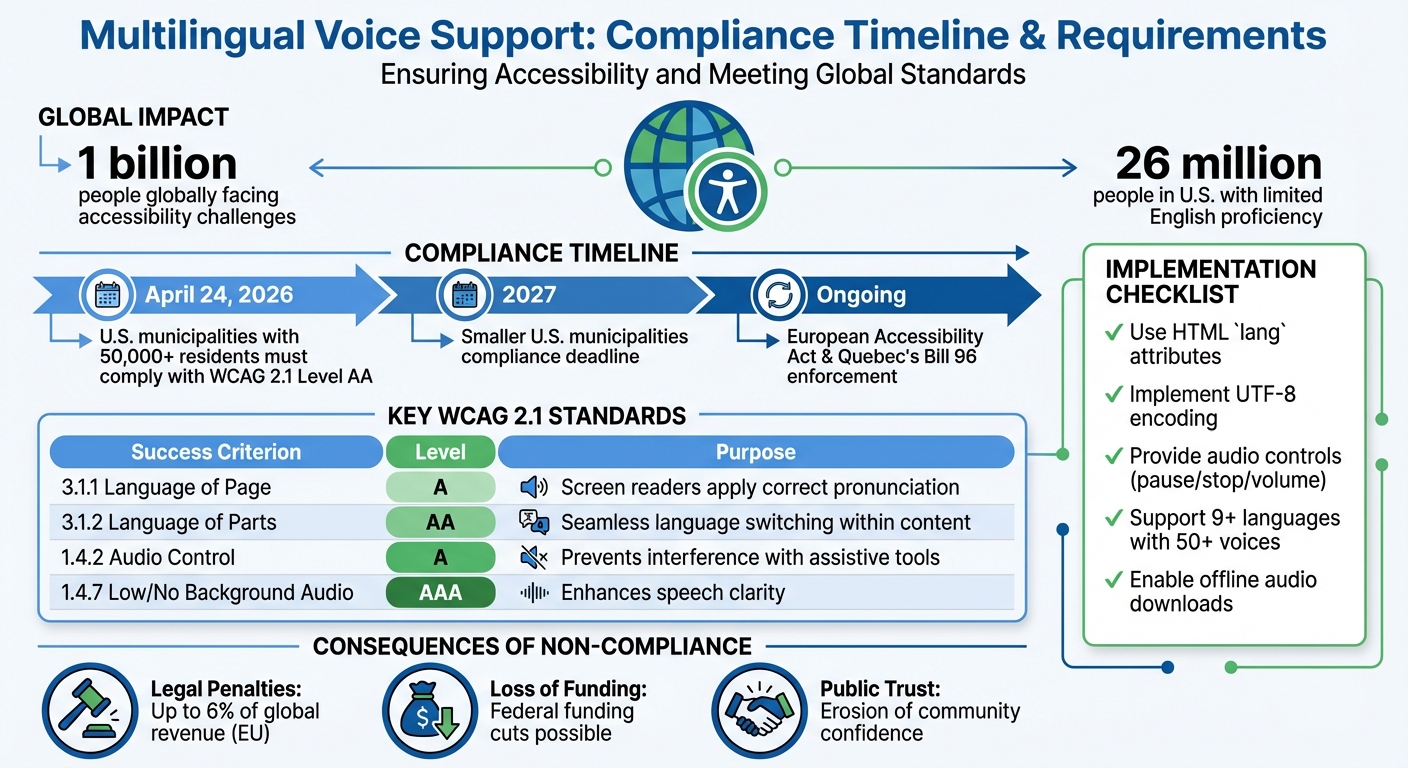
Multilingual voice support ensures people with visual impairments, cognitive disabilities, or language barriers can access information in their preferred language. With over 1 billion people globally facing accessibility challenges, providing accurate and timely audio content is critical. By April 24, 2026, U.S. municipalities with 50,000+ residents must comply with WCAG 2.1 Level AA standards, aligning with global accessibility laws like the European Accessibility Act and Quebec's Bill 96.
lang attributes, UTF-8 encoding, and tools like TTSBuddy to deliver accessible multilingual voice content.This shift emphasizes that language access is no longer optional - it's a legal and practical requirement for effective communication.
If you're tired of managing endless TTS audio files across devices, cloud storage is the solution. It eliminates storage limits, syncs your files automatically, and ensures access from anywhere. Here's why it's a better choice:
With cloud storage, you can centralize your TTS library, avoid manual file management, and enjoy seamless access on any device. Whether you're commuting, working, or studying, your audio files are always ready.
AI-powered text-to-speech (TTS) tools have advanced significantly by 2026, delivering speech quality nearly indistinguishable from human voices. These tools support 100+ languages, regional accents, and even emotional nuances, making them essential for businesses, educators, and accessibility advocates. Below are the seven leading TTS platforms, each offering unique features:
These platforms cater to diverse needs, from accessibility and multilingual content creation to real-time applications. Choose based on your priorities - whether it's cost, voice quality, or language support.