Multilingual Voice Support: Accessibility Standards

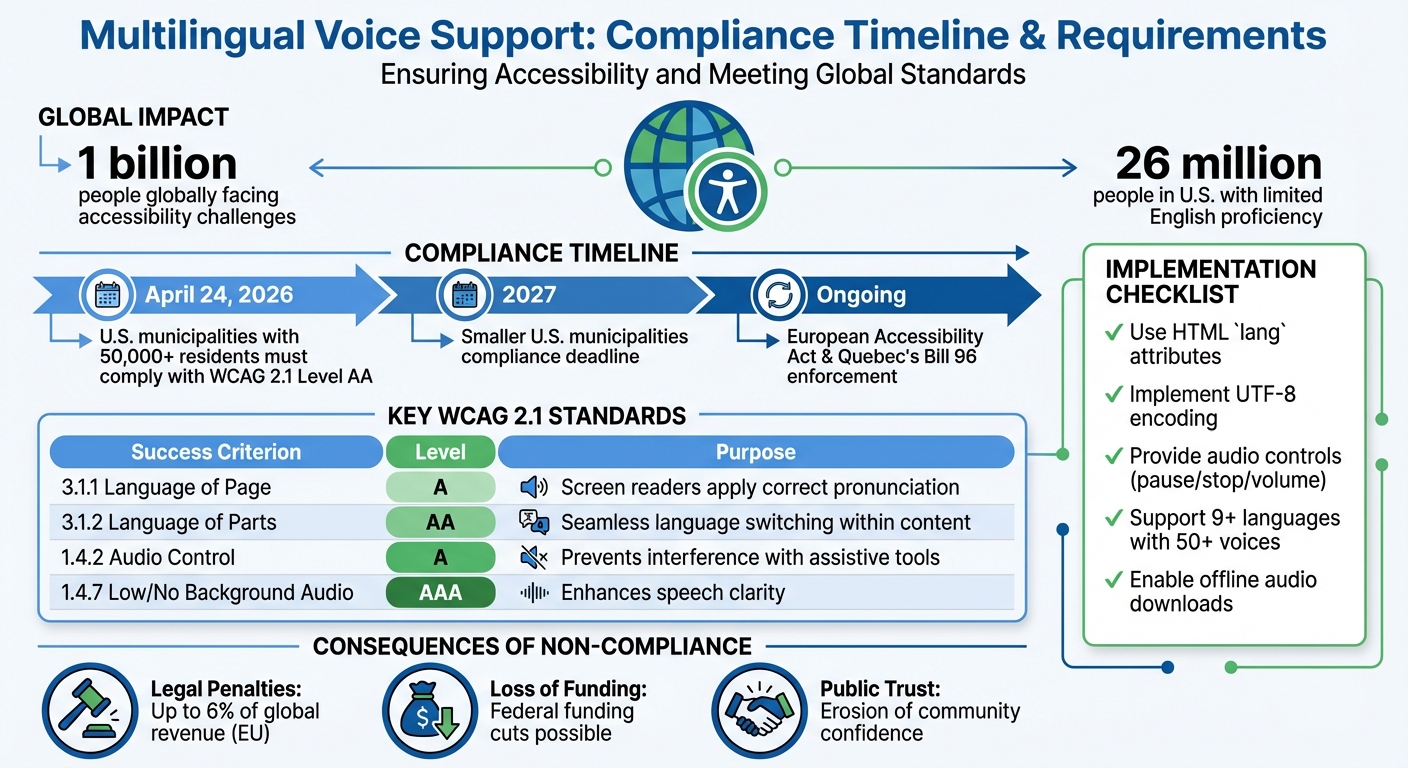
Multilingual voice support ensures people with visual impairments, cognitive disabilities, or language barriers can access information in their preferred language. With over 1 billion people globally facing accessibility challenges, providing accurate and timely audio content is critical. By April 24, 2026, U.S. municipalities with 50,000+ residents must comply with WCAG 2.1 Level AA standards, aligning with global accessibility laws like the European Accessibility Act and Quebec's Bill 96.
Key Takeaways:
- Compliance Deadlines: Large U.S. municipalities must meet WCAG 2.1 standards by April 2026; smaller ones have until 2027.
- Core Standards: WCAG 2.1 criteria ensure proper language tagging, audio controls, and clear pronunciation for assistive tools.
- Implementation: Use HTML
langattributes, UTF-8 encoding, and tools like TTSBuddy to deliver accessible multilingual voice content. - Risks of Non-Compliance: Legal penalties, loss of funding, and public trust erosion.
This shift emphasizes that language access is no longer optional - it's a legal and practical requirement for effective communication.
Understanding WCAG SC 3.1.2 Language of Parts (Level AA)
Accessibility Standards for Multilingual Voice Support
When it comes to multilingual voice support, meeting accessibility standards goes beyond simple translation. It requires a thoughtful approach that ensures voice technologies work seamlessly with assistive tools like screen readers. The Web Content Accessibility Guidelines (WCAG) 2.1 provide a clear framework for creating inclusive voice experiences.
WCAG 2.1 Audio Requirements
WCAG 2.1 outlines specific success criteria that directly impact multilingual voice support:
-
Success Criterion 3.1.1 (Language of Page): At Level A, this criterion ensures that the default language of each webpage is programmatically defined. This allows screen readers to load the correct pronunciation rules automatically. For example, a Spanish-language page will be read with Spanish phonetics instead of English, avoiding confusion for users.
-
Success Criterion 3.1.2 (Language of Parts): At Level AA, this criterion requires that individual sections of text in different languages be tagged appropriately. For instance, if an English webpage includes a French quote, that portion must be marked so assistive technology can adjust pronunciation mid-sentence. The W3C explains:
"Screen readers can load the correct pronunciation rules. Visual browsers can display characters and scripts correctly. Media players can show captions correctly. As a result, users with disabilities will be better able to understand the content."
-
Success Criterion 1.4.2 (Audio Control): At Level A, this criterion mandates that users must have the ability to pause, stop, or adjust the volume of any audio that plays automatically for more than 3 seconds. This ensures that voice content does not interfere with other assistive audio tools.
Here's a quick overview of key WCAG criteria for voice support:
| WCAG Success Criterion | Conformance Level | Purpose for Voice Support |
|---|---|---|
| 3.1.1 Language of Page | Level A | Ensures screen readers apply correct pronunciation rules |
| 3.1.2 Language of Parts | Level AA | Allows seamless language switching within content |
| 1.4.2 Audio Control | Level A | Prevents interference with assistive audio tools |
| 1.4.7 Low/No Background Audio | Level AAA | Enhances speech clarity by reducing background noise |
These guidelines create a solid foundation for accessible multilingual audio experiences.
Voice Quality and Clarity Standards
The quality of voice synthesis is more than a technical detail - it's crucial for accessibility. Poor voice quality or mispronunciations can make content hard to understand, particularly for users with cognitive disabilities or hearing impairments.
- Success Criterion 1.4.7 (Low/No Background Audio): At Level AAA, this criterion requires background sounds to be at least 20 decibels quieter than foreground speech, or entirely removable. This ensures that spoken content is clear and easy to follow.
- Success Criterion 3.1.6 (Pronunciation): This criterion focuses on providing mechanisms to clarify pronunciation when it affects meaning. This is especially important for technical terms or languages where words can have multiple pronunciations.
Dayana Abuin Rios, Global Content Manager at Interprefy, highlighted the growing importance of accessibility in multilingual settings, stating:
"The year 2025 marks a turning point for accessibility in multilingual events... accessibility has become a legal requirement rather than a moral aspiration."
By prioritizing clear pronunciation and reducing audio distractions, voice technologies can significantly improve comprehension for all users.
Language Detection and Multi-Language Support
Accurate language detection is another cornerstone of effective multilingual voice support. Content must be programmatically marked with the HTML lang attribute to load the correct pronunciation rules and voices automatically. This process relies on IETF BCP 47 language tags (e.g., "en", "es", "en-US").
For mixed-language content, inline elements like <span> can be tagged with the appropriate lang attribute. This ensures that screen readers can instantly adjust pronunciation for foreign words or phrases. As WCAG documentation notes:
"For users relying on screen readers, correctly identified language changes mean that the screen reader can switch to the appropriate pronunciation rules and voices. Without this, foreign words or phrases would be mispronounced, making the content difficult or impossible to understand."
It's also essential to apply language attributes to dynamically loaded content, such as elements added via JavaScript. However, proper names, technical terms, and borrowed words from other languages are generally exempt from this requirement, reducing unnecessary processing.
Platforms like TTSBuddy showcase how these standards work in practice. With support for more than 30 language modes and 300+ voices, TTSBuddy converts web pages into natural-sounding audio while respecting language boundaries and pronunciation rules. By offering these tools for free, it removes financial barriers, making multilingual voice support more accessible to a broader audience.
How to Implement Multilingual Voice Support
Real-time language adaptation is crucial for ensuring accessibility during live events, websites, and IVR systems. Proper implementation of multilingual voice support requires careful planning to ensure all tools function seamlessly across languages.
Websites and Web Applications
Start by setting language declarations and encoding standards to ensure assistive technologies interpret content properly. Use the <html> element's lang attribute (e.g., <html lang="en">) to establish pronunciation and grammar rules right from the beginning.
For content that mixes languages - like an English article with a French quote - apply the lang attribute to specific elements (e.g., <span lang="fr">Bonjour</span>) to activate the correct voice synthesizer. Always use UTF-8 encoding to support non-Latin scripts like Arabic, Chinese, or Hebrew, ensuring compatibility with assistive tools.
For single-page applications or sites with language-switching features, dynamically update the lang attribute whenever users change the language. Stick to two-letter ISO codes (e.g., lang="en") unless regional variants are absolutely necessary, as this allows screen readers to pick up the user's preferred accent automatically.
Translation can alter text length significantly - German text, for instance, can expand by 35%, while French typically grows by 20-30%. To accommodate this, avoid fixed-width containers and use CSS Grid or Flexbox to allow components to resize or wrap smoothly. For Right-to-Left (RTL) languages like Arabic or Hebrew, rely on CSS logical properties (e.g., margin-inline-start instead of margin-left) so layouts adjust properly.
A practical example of these principles is TTSBuddy, which converts web pages into natural-sounding audio in 30+ language modes with 300+ voices. It respects language boundaries and pronunciation rules, offering a cost-free solution to multilingual accessibility.
IVR Systems
Interactive Voice Response (IVR) systems introduce unique challenges for multilingual support. Many organizations now favor Text-to-Speech (TTS) solutions over pre-recorded prompts, as TTS allows for instant message updates.
Start calls with a language selection menu (e.g., "For English, press 1. Para espanol, oprima el dos.") to route callers appropriately. After language selection, use centralized data storage, such as DynamoDB, to retrieve JSON objects containing translated messages tailored to the caller's language.
Organize separate language queues with custom names, specific hold music, and fluent agents to handle different languages effectively. Utilize Speech Synthesis Markup Language (SSML) for flexible and high-quality playback, controlling pronunciation, pitch, and volume across languages.
For custom recordings, adhere to the telephony standard of 8-bit PCM mono with an 8 kHz sampling rate and 64 kbit/s bitrate. Normalize audio levels and eliminate background noise to ensure clarity, especially for users with hearing impairments. Use Unicode encoding for all text data to maintain consistency across different scripts.
Account for text expansion in IVR systems - languages like German or Italian often require longer playback times or adjusted menu timeouts due to their increased word length. As noted on the Amazon Connect Blog:
"The traditional approach of recording voices is not only expensive but it also hinders the ability to quickly change the messaging played on the fly."
Live Events and Video Content
Live events and video content demand real-time language adaptation to meet accessibility needs. For interactive live communications, use Session Description Protocol (SDP) attributes like hlang-send and hlang-recv to negotiate language preferences between participants or translators.
Set default languages for media players to ensure accurate captions and speech synthesis. If a video switches languages mid-stream, use the lang attribute to identify passages, enabling screen readers and speech synthesizers to adjust accents and pronunciation instantly.
Modern AI TTS systems now produce expressive, natural-sounding speech. Provide controls for playback speed, pitch, and voice type, along with an easy-to-use toggle for enabling or disabling voice support. For live captions or overlays, use CSS logical properties to ensure layouts adapt properly for RTL languages.
Incorporate language detection to suggest options based on browser settings, but always offer a manual language switcher that uses native names - like displaying "Deutsch" instead of "German".
Be transparent about AI-generated voices to avoid confusion and ensure compliance with licensing and copyright laws. For technical terms or uncommon words in video content, include a way for users to access correct pronunciations, such as an audio clip or a written guide.
How to Choose Multilingual Voice Support Tools
What to Look for in a Solution
When selecting a multilingual voice support tool, focus on three key aspects: voice quality, linguistic precision, and user customization. The best tools use advanced neural networks and AI to create speech that sounds natural, with intonation and emotion that suit various scenarios. Unlike older, rule-based text-to-speech (TTS) systems, modern solutions deliver expressive and adaptable output.
Accurate language handling is just as important. A good tool should correctly pronounce names, technical terms, regional dialects, and even culturally specific references. From a technical standpoint, look for high-fidelity audio output (minimum 48 kHz/24-bit resolution) and adherence to loudness standards like EBU R128 in Europe or ATSC A/85 in the US. Clarity is also crucial - background sounds should be managed effectively to ensure the speech remains clear.
Customization options are another must-have. Users should be able to tweak playback speed, pitch, and voice type. Features like pause, stop, and independent volume controls are essential, especially for compliance with WCAG 2.1 guidelines. For instance, WCAG 2.1 Success Criterion 1.4.2 mandates that audio playing automatically for over three seconds must include volume controls.
Accessibility compliance is non-negotiable. Ensure the tool meets WCAG 2.1 or 2.2 Level AA standards and adheres to privacy regulations like GDPR and CCPA. Since automated tools only catch 30-40% of accessibility issues, manual testing by users, especially those with visual impairments, is vital. As the American Council of the Blind emphasizes:
"Accessibility should never be an afterthought or a budget-based compromise." - American Council of the Blind
To make an informed choice, consider practical factors like these:
- Does the tool support the dialects and accents relevant to your audience?
- Can it handle real-time translation or high-volume TTS tasks?
- Does it integrate with platforms like WordPress or Shopify via APIs or plugins?
- Is the output optimized for screen readers and other assistive technologies?
Evaluate how well the tool aligns with your system needs while meeting these criteria.
Integration with Current Systems
Smooth integration is key, and it depends on your organization's technical setup. The integration method should complement the tool's customization features to ensure accessibility across all platforms.
| Integration Type | Technical Effort | Flexibility | Best For |
|---|---|---|---|
| CMS Plugins | Low (minimal setup) | Limited | WordPress, Shopify, Joomla sites |
| Cloud APIs | High (requires coding) | High | Custom web/mobile apps needing scalability |
| Browser-Based | None (no-code) | Moderate | Quick implementation for existing sites |
| AI Chatbots | Moderate | High | Interactive customer support |
For websites with dynamic or user-generated content, consider using language detection APIs to apply the correct lang attribute automatically. This ensures screen readers switch to the proper pronunciation rules. Embedding accessibility checks into your CI/CD pipeline using tools like IDE plugins or pre-commit hooks can help catch issues early. Always use standard BCP 47 language codes (e.g., en for English, zh for Chinese) for compatibility across platforms. Additionally, ensure the solution works seamlessly with popular screen readers like NVDA, JAWS, and VoiceOver. For media-heavy applications, audio ducking can prevent background sounds from drowning out narration.
Integrating accessibility from the start is far more cost-effective than retrofitting later. For context, initial accessibility remediation costs can range from $5,000 to $20,000 for small websites, $20,000 to $100,000 for medium businesses, and over $100,000 for large enterprises, depending on complexity.
Case Study: TTSBuddy
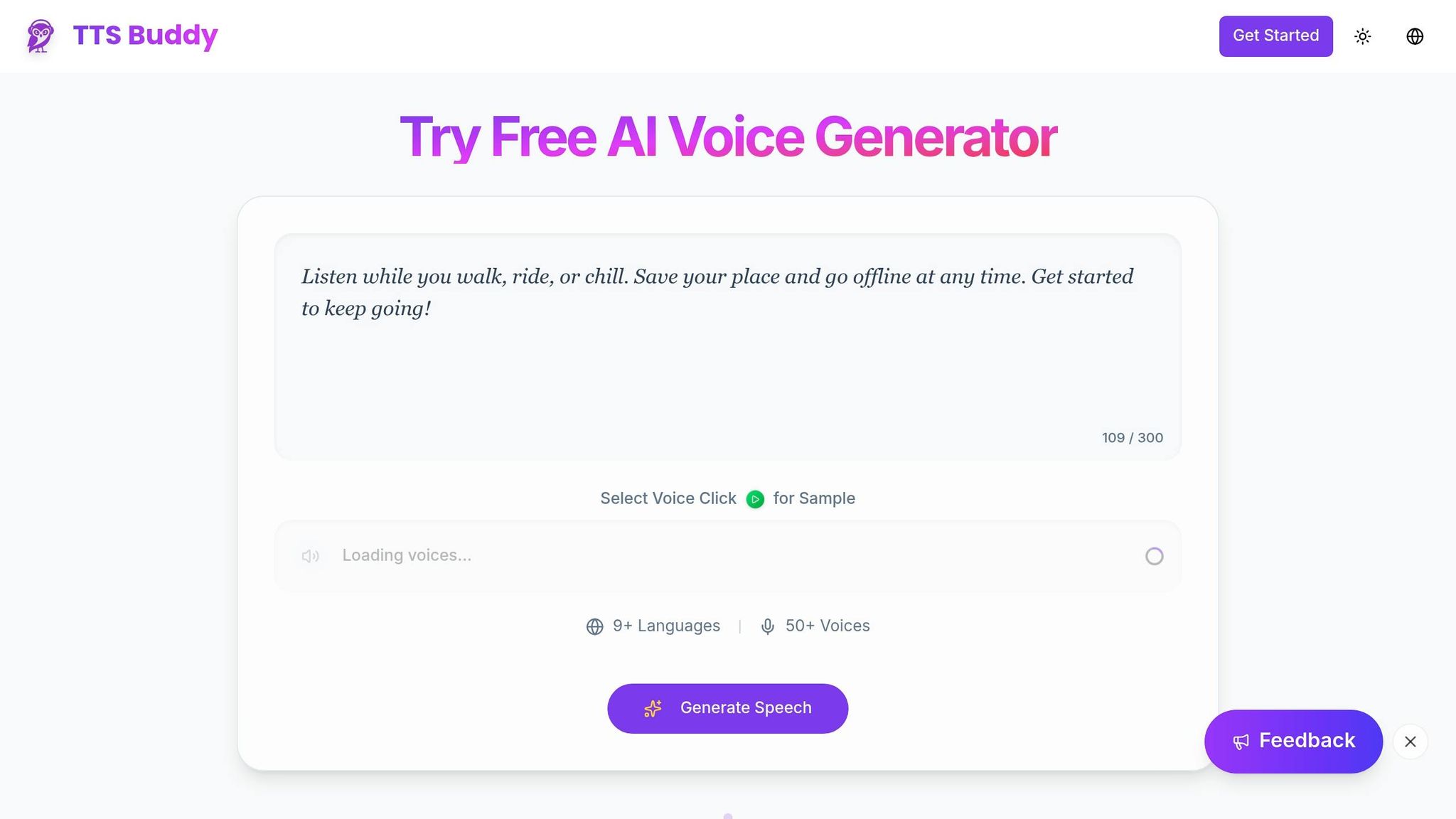
A great example of these principles in action is TTSBuddy. This free, AI-powered TTS platform delivers natural-sounding speech in more than 30 language modes with 300+ voices, addressing the needs of over one billion people globally who require improved language access and accessibility.
TTSBuddy stands out for its accessibility-focused features. Users can download audio for offline use - a crucial benefit for those with unreliable internet. Its Chrome extension enables conversational voice interaction with webpages, making it helpful for individuals with visual impairments or diverse learning needs. The platform ensures accurate pronunciation across multiple languages and meets WCAG standards, all at no cost. This makes it a valuable resource for schools, nonprofits, and organizations with tight budgets.
Additional features like one-click conversion of webpages into clean Markdown simplify content preparation, and its upcoming API will expand its usability for custom applications and workflows. TTSBuddy demonstrates how combining quality, accessibility, and seamless integration can result in a highly effective voice support tool.
Conclusion
The Role of Multilingual Voice Support
As of 2026, multilingual voice support will no longer be optional - it's a legal requirement. The U.S. Commission on Civil Rights has emphasized that language access is a protected civil right under federal law (Title VI of the Civil Rights Act). In the United States alone, around 26 million people have limited English proficiency, while globally, over 1 billion individuals are impacted by language access laws. Non-compliance with these laws can result in significant penalties, such as fines of up to 6% of global revenue in the European Union or daily fines under Quebec's Bill 96 until violations are resolved. Beyond the financial risks, inaccessible communication can lead to serious issues like medical errors, ineffective consent, and lost customers. Implementing multilingual voice solutions ensures equitable communication for people with visual impairments, learning disabilities like dyslexia, and those who are not native speakers.
These legal and practical challenges highlight the need for organizations to take immediate, proactive measures.
Next Steps for Organizations
For organizations, meeting these requirements means taking deliberate action. Start by auditing your digital platforms against WCAG 2.1 Level AA standards, keeping compliance deadlines in mind. Incorporating accessibility features during the design phase is far more cost-effective - estimates suggest it's 4 to 10 times cheaper than retrofitting existing systems. Make sure your solutions include programmatic language identification using the lang attribute, which helps screen readers pronounce content correctly. Additionally, provide user-friendly controls for playback speed, volume, and voice type to align with WCAG standards.
One tool to consider is TTSBuddy - Built for people with accessibility needs. This platform offers free AI-powered text-to-speech in more than 30 language modes and 300+ voices. With features like downloadable audio for offline use and conversational voice interaction with webpages, it's especially helpful for schools, nonprofits, and organizations working with limited budgets. Acting now, especially with the April 24, 2026 deadline for large U.S. municipalities, not only ensures compliance but also helps better serve multilingual communities.
FAQs
What's the fastest way to audit my site for WCAG 2.1 AA language and audio issues?
To ensure compliance with WCAG 2.1 AA, automated accessibility tools can be a great starting point. Focus on criteria such as 3.1.1 (Language of Page) and 3.1.2 (Language of Parts) during your checks. These standards are crucial for making content understandable to users and compatible with assistive technologies.
Start by verifying the <html> tag's lang attribute. This attribute should accurately reflect the primary language of the page. If your content includes sections in a different language, make sure these parts are properly marked with the correct lang attributes. This helps screen readers switch to the appropriate language settings, ensuring a seamless experience for users.
While automated tools can flag missing or incorrect language attributes, they can't catch everything. Combine these scans with manual reviews to confirm the accuracy of language settings. Additionally, check that audio outputs from screen readers align with the designated language attributes. This ensures content is not only accessible but also easy to understand for users relying on assistive technologies.
How can I ensure screen readers switch pronunciation correctly on mixed-language pages?
To improve accessibility for multilingual content, make use of the lang attribute in your HTML. Set the primary language for the entire page in the <html> tag, like this: <html lang="en">. For sections in other languages, specify their language within the relevant elements. For example: <span lang="fr">Bonjour</span>. Always use standard ISO language codes for accuracy.
This approach allows screen readers to adjust pronunciation dynamically, making the content more accessible to users who rely on assistive technologies.
What audio controls are required to meet WCAG 2.1 for auto-playing voice content?
To meet WCAG 2.1 guidelines, any audio that plays automatically for more than three seconds must provide controls to pause, stop, or adjust the volume separately from the system's volume settings. This helps users manage audio playback easily, making the content more accessible for everyone.