AI Voice Tools vs. Traditional Screen Readers

If you've ever wondered whether you should use a screen reader, an AI voice tool, or both — you're not alone. These two categories of tools overlap in some ways, but they're built for very different jobs. Understanding where each one shines (and where it doesn't) can save you a lot of frustration.
Here's the short version:
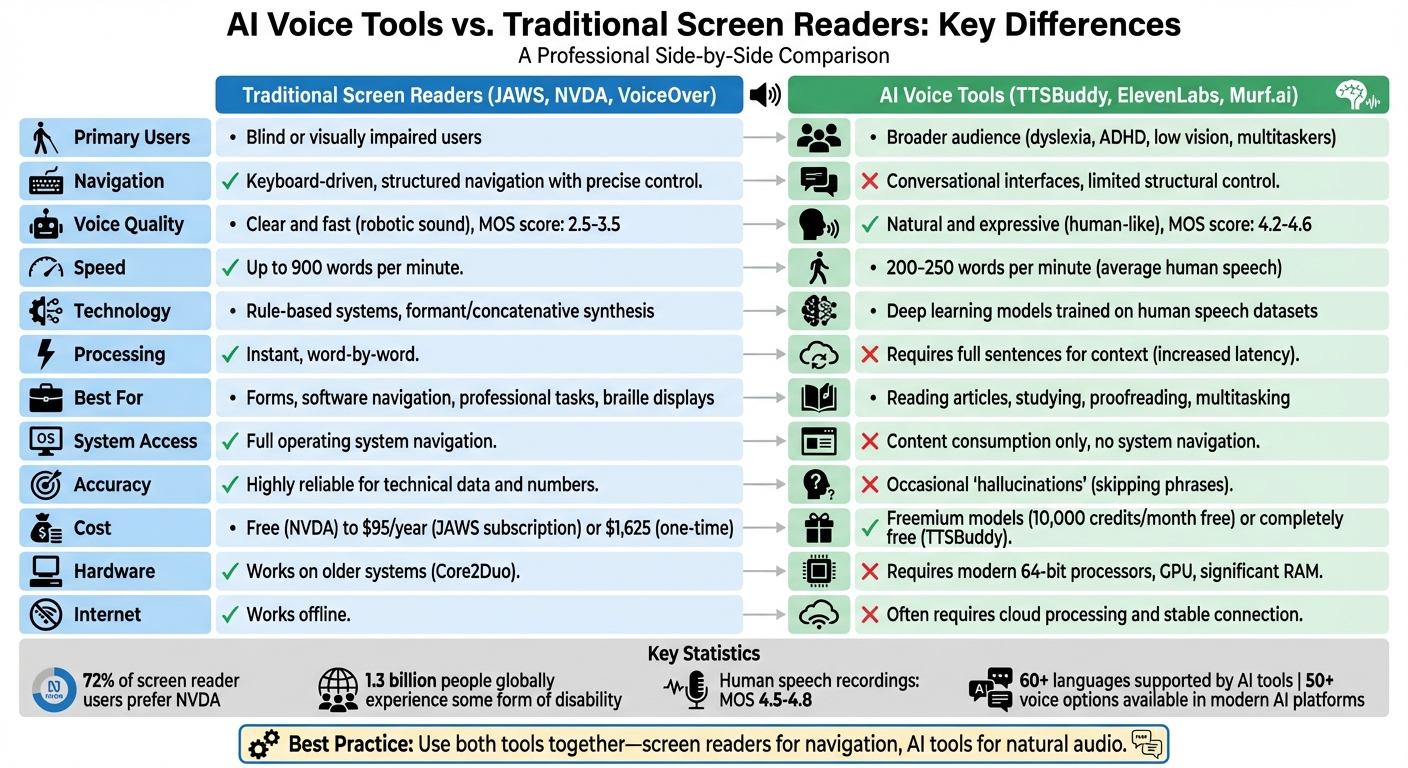
- Screen readers like JAWS, NVDA, and VoiceOver are designed for blind or visually impaired users who need to navigate entire operating systems — buttons, menus, forms, tabs, all of it. They're precise, fast, and keyboard-driven.
- AI voice tools are built for listening. They turn articles, PDFs, emails, and study material into natural-sounding audio. They're great for people with dyslexia, ADHD, low vision, or anyone who just prefers to listen instead of read.
The biggest differences boil down to five things:
- Navigation — Screen readers give you granular, element-by-element control over an interface. AI voice tools are more of a "press play and listen" experience.
- Voice quality — AI tools sound remarkably human. Screen readers prioritize clarity and speed, even if that means sounding robotic.
- Use cases — Need to fill out a form or navigate complex software? Screen reader. Want to listen to a research paper while cooking? AI voice tool.
- Under the hood — Screen readers use rule-based systems that are fast and predictable. AI tools use deep learning models that sound better but can occasionally stumble.
- Cost — Free screen readers like NVDA exist. AI tools often use freemium models — TTSBuddy, for example, offers free basic features with no subscription required.
A tip worth remembering: You don't have to pick one. Many people get the best results by combining a screen reader for navigation with an AI voice tool for comfortable, long-form listening.
How These Tools Actually Work (and Why It Matters)
The technology behind screen readers and AI voice tools couldn't be more different, and that shapes everything about the experience.
Traditional screen readers generate speech using two main methods: formant synthesis, which creates sounds mathematically, and concatenative synthesis, which stitches together tiny clips of recorded human speech. Both approaches follow strict pronunciation rules, and while users can add custom dictionary entries to fix mispronunciations, the system is fundamentally rule-based. The upside? It's incredibly fast — speech is generated almost instantly, word by word.
AI voice tools take a completely different path. They rely on deep learning models trained on thousands of hours of real human speech. Models like MaskGCT learn to capture the subtle rhythms, pauses, and emotional shifts that make speech sound natural. Instead of following rigid rules, these models predict how text should sound based on patterns they've absorbed. The result is speech that sounds remarkably lifelike — but there's a catch. AI models need full sentences (sometimes paragraphs) to understand context before they can generate audio, which introduces latency.
This latency matters more than you might think. In January 2026, a developer named Sam tested two AI-based TTS systems — Supertonic and Kitten TTS — as potential add-ons for NVDA. While Supertonic's streaming approach made it faster, both systems struggled with the kind of rapid, interruptible navigation that blind users depend on. When you're tabbing through a webpage at high speed, you need speech that starts and stops instantly. AI models aren't there yet.
So What Does This Mean for Voice Quality?
The gap in naturalness is significant. On the Mean Opinion Score (MOS) scale — a 1-to-5 rating of voice quality — traditional TTS systems typically land between 2.5 and 3.5. Advanced AI systems score between 4.2 and 4.6, which is close to human recordings (4.5 to 4.8). AI voices have natural pauses, breaths, and even emotional nuance that rule-based systems simply can't produce.
But here's the thing: naturalness isn't always what you want.
"While sighted users prefer voices that are natural, conversational, and as human-like as possible, blind users tend to prefer voices that are fast, clear, predictable, and efficient." — Sam T., Screen Reader Developer
The Eloquence voice, a favorite among English-speaking blind users, hasn't been updated since 2003 — and people still love it. Why? Because it's rock-solid at 800 to 900 words per minute. That's three to four times faster than normal human speech. At those speeds, naturalness doesn't matter. Consistency does.
AI voices, meanwhile, occasionally "hallucinate" — skipping short phrases or misreading text. Rule-based systems are much more reliable with technical data, numbers, and edge cases.
What Each Tool Can Actually Do
Navigating Content
This is where the divide is starkest. Screen readers like JAWS, NVDA, and VoiceOver are navigation tools at their core. They use keyboard commands, touch gestures, and the structural markup of web pages — headings, landmarks, ARIA attributes — to let users move through content element by element. You can jump between links, skip to a specific heading level, tab through form fields, and interact with every button on the page.
AI voice tools don't do any of that. They read content to you. That's their job, and they do it well — but they're not designed to help you interact with a website.
That said, the line is starting to blur. The 2025 version of JAWS includes FSCompanion, an AI assistant that responds to natural language. Instead of memorizing dozens of keyboard shortcuts, you can ask things like "How do I adjust my voice settings?" or "Can you summarize this page?" It's a meaningful step toward making screen readers more approachable without sacrificing their power.
"Accessibility is whether you can operate at speed and with dignity, whether you can complete the same real-world tasks as everyone else without needing a workaround or a favor." — Aaron Di Blasi, Publisher, Top Tech Tidbits
Dealing with Images and Messy Interfaces
Here's where AI is genuinely changing things. Traditional screen readers rely entirely on alt text to describe images — if the alt text is missing or bad, you're out of luck. The 2025 version of NVDA now includes built-in AI that can automatically generate image descriptions, read text inside graphics, and recognize objects. That's a real game-changer for poorly labeled content.
"The most significant addition to NVDA is its built-in AI image description capability. This feature automatically generates descriptions for images that lack proper alt text." — Sophia Patel, Creative Accessibility Blogger
AI tools can also use visual reasoning to figure out what unlabeled buttons or broken menus are supposed to do. Some can even follow instructions like "pay this bill" or "confirm the appointment." For well-coded, standards-compliant websites, screen readers are still more reliable. But for the messy reality of most of the web? AI has a real edge.
Languages and Voice Options
Traditional screen readers tend to use older voice engines — Eloquence, eSpeak — that are optimized for speed rather than naturalness. They're robotic, but they get the job done, and experienced users can fine-tune pitch, rate, and punctuation handling to their exact preferences.
AI voice tools offer much more variety. Many platforms support 60+ languages with natural-sounding voices. Some even offer celebrity voices or custom pronunciation libraries. ReadSpeaker, for instance, lets you customize how technical terms and proper nouns are spoken — a real benefit for STEM content. TTSBuddy supports 30+ language modes with 300+ voice options, and it's free.
The trade-off? AI voices still can't match the speed and predictability that experienced screen reader users rely on for professional work.
Ease of Use and What You'll Need
The Learning Curve
AI voice tools are dead simple. Open TTSBuddy, paste some text (or use the Chrome extension), pick a voice, and press play. No training required.
Screen readers are a different story. JAWS and NVDA require learning a substantial set of keyboard shortcuts, navigation commands, and gestures. That learning curve is real — but it's also what makes them so powerful. Once you've internalized those shortcuts, you can fly through content faster than most sighted users can read.
JAWS 2025's FSCompanion helps bridge this gap by letting new users ask questions in plain English instead of digging through documentation. As Deiv Mico from Accessibility-Test.org notes:
"The introduction of FSCompanion represents a major shift in how users learn and get help with JAWS. This AI assistant can answer questions about JAWS functionality... in natural language."
Still, power users overwhelmingly stick with traditional keyboard navigation because nothing beats it for speed. As Sam puts it:
"While sighted users prefer voices that are natural, conversational, and as human-like as possible, blind users tend to prefer voices that are fast, clear, predictable, and efficient."
Hardware Requirements
This is a practical concern that gets overlooked. Traditional screen readers are incredibly lightweight. They run fine on decade-old hardware — even Core2Duo processors. They're often built right into the operating system (Windows Narrator, Apple VoiceOver, Android TalkBack), so there's nothing extra to install. And they work entirely offline.
AI voice tools generally need more muscle — modern processors, dedicated GPUs for local models, or at least a solid internet connection for cloud-based processing. If you're on an older machine or have spotty Wi-Fi, a screen reader will always work. An AI voice tool might not.
What Does It Cost?
Free Options
The good news is there are solid free options on both sides.
For screen readers, NVDA is the gold standard — free, open-source, and used by 72% of screen reader users. Built-in options like VoiceOver, Narrator, and ChromeVox are also free but platform-specific. Commercial screen readers aren't cheap — JAWS starts at $95/year (or $1,625 to buy outright), and Dolphin starts at $1,105.
For AI voice tools, most follow a freemium approach. ElevenLabs gives you 10,000 credits/month free. Murf.ai offers 10 minutes of free voice generation. TTSBuddy goes further — it's completely free for AI-powered text-to-speech with 300+ voices in 30+ language modes, including audio downloads for offline use.
Getting the Most Bang for Your Buck
Cost isn't just about price tags — it's about what barriers those prices create. Fernando from Brazil puts it plainly:
"Companies never hire us because they do not want to bear the cost of the screen reader. NVDA enables my entry into the labor market without imposing extra costs on employers."
Free tools like NVDA and TTSBuddy aren't just convenient — they're essential for making digital access genuinely inclusive. When a $1,600 screen reader is the only option, a lot of people get left behind.
Introduction to AI Tools for Screenreader Users
So, When Should You Use What?
When AI Voice Tools Are the Better Choice
Anytime you want to listen rather than interact. Commuting, cooking, exercising, doing laundry — AI voice tools turn that dead time into productive time. Their natural-sounding voices also make long study sessions or research reading much less fatiguing than robotic speech.
They're especially helpful for students with dyslexia or ADHD. Hearing text read aloud while following along on screen creates a dual-channel learning experience that improves comprehension. Writers and editors also swear by them for proofreading — your ear catches mistakes your eyes skip right over.
For STEM content with mathematical symbols and complex formatting, advanced AI tools generally handle it better than traditional options. And for a deeper dive, check out our guide to the 10 best text-to-speech tools for ADHD study.
TTSBuddy is a good place to start — it's free, lets you download audio for offline listening, and the Chrome extension lets you interact with web content directly.
When You Need a Screen Reader
If you're blind or severely visually impaired, a screen reader isn't optional — it's how you use a computer. Full stop. Screen readers provide the keyboard shortcuts, structural navigation, and assistive device integration (like braille displays) needed to interact with buttons, forms, browser tabs, and complex software.
They're also essential for power users who process content at 800-900 words per minute. No AI voice tool can match that speed while remaining clear and interruptible.
Why Not Both?
Here's the thing — you don't have to choose. Many people use both, and it works great. Fredrik Larsson, Co-founder and Chief Architect of ReadSpeaker, puts it well:
"ReadSpeaker's TTS program can be used as a standalone solution or as a complement to a screen reader."
A common setup: use your screen reader to navigate a website — find the right page, handle the menus and buttons — then switch to an AI voice tool to actually enjoy the article in a natural, expressive voice. This combination is especially valuable for students with multiple disabilities who need both structured navigation and comfortable long-form listening.
The Bottom Line
There's no single "best" tool here. It depends entirely on what you're trying to do.
Need to navigate an operating system, fill out forms, or work with complex software? A screen reader like NVDA, JAWS, or VoiceOver is irreplaceable.
Want to listen to articles, study materials, or emails with a natural-sounding voice? An AI voice tool is the way to go. They're especially valuable for people with dyslexia, ADHD, or anyone who wants to consume content while doing something else.
Want the best of both worlds? Use them together. Screen reader for navigation, AI voice tool for comfortable listening.
Both types of tools have trade-offs. Screen readers can sound robotic. AI voices occasionally lag or skip words. Neither is perfect — but together, they cover a lot of ground.
If you want to try AI-powered text-to-speech without any commitment, TTSBuddy is free to use. You get access to 300+ voices in 30+ language modes, audio downloads for offline listening, and a Chrome extension that lets you interact with webpages. No subscription, no credit card — just paste your text and listen.
With roughly 1.3 billion people worldwide living with some form of disability, having a variety of tools available isn't a luxury — it's a necessity. The right setup is whatever helps you get your work done comfortably and efficiently.
FAQs
Can an AI voice tool replace a screen reader for daily computer use?
Not really — at least not yet. AI voice tools are excellent for turning text into natural-sounding audio, but they can't navigate an operating system the way JAWS or VoiceOver can. They don't handle buttons, forms, menus, or keyboard-driven navigation. If you rely on a screen reader to use your computer, an AI voice tool is a great addition, not a replacement.
Why do AI voices sometimes lag or skip words?
It comes down to how they work. AI voices process full sentences (or chunks of text) to understand context before generating speech. Screen readers process word by word, which is why they're faster. At high speeds — 800+ words per minute — AI models can struggle with timing, leading to occasional skips or delays. Screen reader voices are specifically tuned for rapid, uninterrupted delivery, even if they sound less natural.
What's the best way to use TTSBuddy alongside a screen reader?
Use your screen reader for navigation — finding the right page, handling menus and forms — and switch to TTSBuddy when you want to sit back and listen. You can paste text directly into TTSBuddy or use the Chrome extension to convert webpages into audio. With support for multiple languages and voices, it adds a layer of comfortable, natural-sounding audio that complements your screen reader's navigation capabilities.