Can't Find Time to Read? Here's How Audio Helps

Struggling to find time to read? Audio can help you stay informed and productive without disrupting your busy schedule. Tools like TTSBuddy convert text into lifelike speech, letting you listen to articles, reports, or books (or use a Chrome extension for web pages) while commuting, exercising, or doing chores.
Here's why audio is a game-changer:
- Save time by turning idle moments into learning opportunities.
- Accessibility for users with dyslexia, ADHD, or visual impairments.
- Flexibility with offline listening and adjustable playback speeds.
- Ease of use with platforms like TTSBuddy offering free and premium features, including multi-language support and PDF and document conversion.
Whether you're catching up on industry trends or enjoying a book, audio fits seamlessly into your daily life. Explore TTSBuddy to transform how you consume content today.
How AI Audio Makes Content Consumption Easier
AI-driven text-to-speech (TTS) technology is reshaping the way we engage with written content, offering a seamless way to absorb information while on the move. With TTSBuddy's natural-sounding voices, powered by human-like rhythm and intonation, the audio feels conversational rather than mechanical. This makes it easier to focus on the ideas being presented, rather than struggling with robotic-sounding speech.
Modern neural networks, trained on vast datasets of human speech, have mastered subtle nuances like the upward inflection at the end of a question. This makes long-form audio not only easier to follow but also more engaging and enjoyable to listen to. These advancements don't just improve clarity - they help you make better use of your time.
As the platform Read This To Me puts it:
"When text becomes voice, the visual friction melts away and the cognitive effort shifts toward understanding ideas instead of deciphering shapes on a page." – Read This To Me
Save Time with Audio
AI audio also helps you reclaim time in your day by letting you consume content during moments that might otherwise go unused. Whether you're stuck in traffic, exercising, or tackling household chores, you can listen to articles, reports, or other materials without needing to stop what you're doing. With TTSBuddy, you can even download audio files for offline listening, so you're not tied to a Wi-Fi or data connection.
Adjustable playback speeds further enhance flexibility. You can speed up familiar material to move through it quickly or slow things down when you're diving into complex topics and need to absorb every detail.
Accessibility for All Users
AI audio doesn't just save time - it also makes content more accessible. For individuals with dyslexia, ADHD, or visual impairments, audio eliminates many of the challenges associated with traditional reading. TTSBuddy's clear, easy-to-follow voices reduce the mental strain of processing text, allowing users to concentrate on the message itself.
Features like synchronized text highlighting, which matches the audio in real time, enhance focus and retention - especially when working through dense or technical material. With over 50 million people worldwide relying on AI text-to-speech tools, it's evident that audio-based content has become an essential resource for people from all backgrounds and abilities.
Getting Started with TTSBuddy's Free Plan
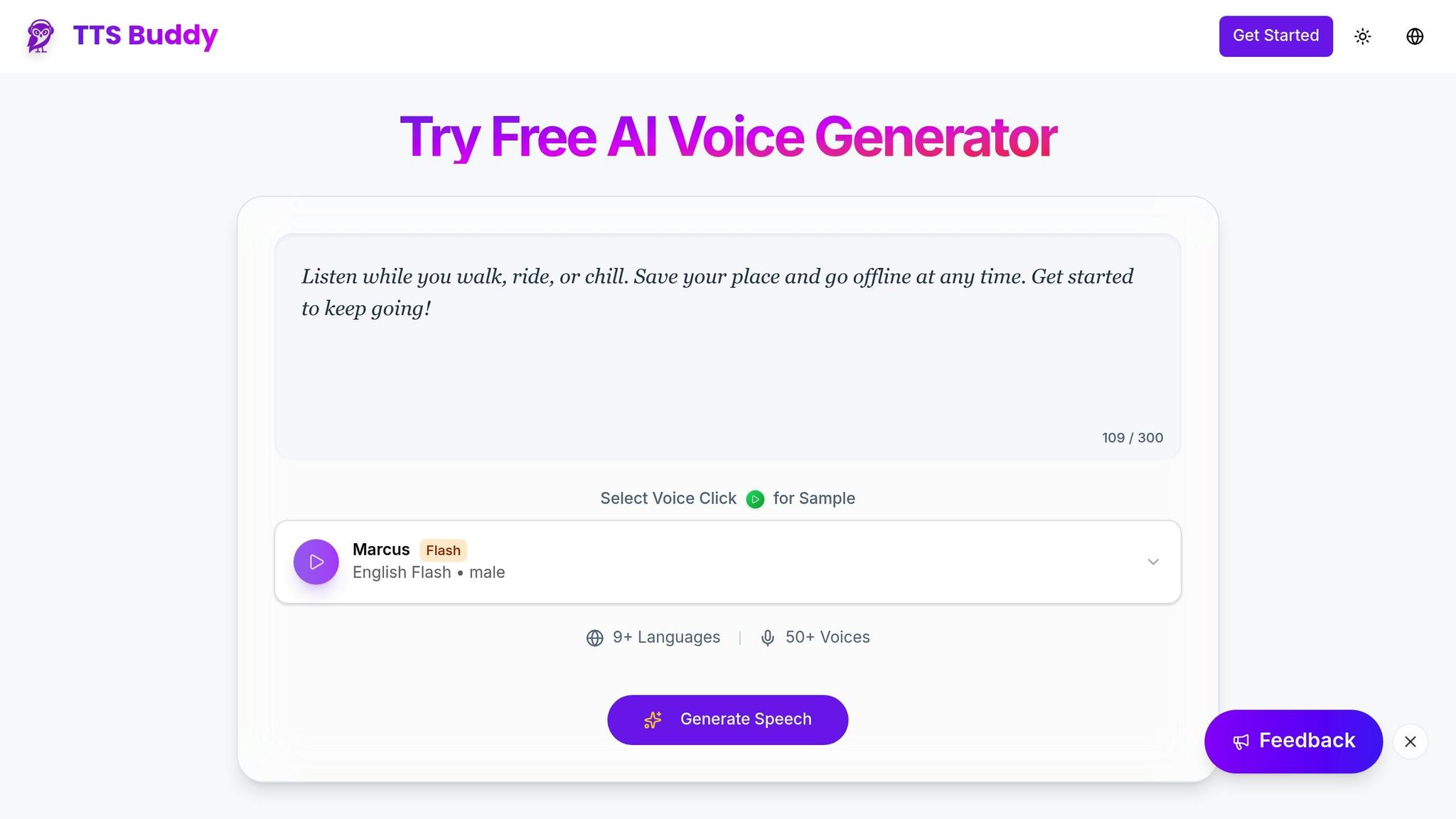
TTSBuddy's free plan makes it easy to add audio to your busy schedule. Setup takes just minutes, and the best part? It's a free AI voice generator. You can start transforming written content into audio right away, giving you a chance to explore the platform and see how it fits into your daily life.
Sign Up and Upload Content
Go to ttsbuddy.com and create your free account. Once logged in, you'll find a simple, user-friendly interface. Here, you can either paste text directly or upload documents for conversion. The platform supports several file types, including PDF, EPUB, DOCX, XLSX, and TXT, as well as web links. Just choose the option that works best for your content.
Using the Doc Buddy feature, your uploads are processed almost instantly, converting text into lifelike speech in seconds. Whether it's a work document, a research paper, or an e-book chapter, the system generates natural-sounding audio effortlessly. Even with the free plan, you gain access to 300+ voices in 30+ language modes, allowing you to pick a voice that suits your preferences for longer listening sessions.
Once your content is processed, you can easily take it offline for convenient listening.
Download Audio for Offline Listening
One standout feature of TTSBuddy's free plan is the ability to download your audio files. The Offline Buddy option lets you save your converted content directly to your device, so you can listen without Wi-Fi or mobile data. This is perfect for commutes, travel, or any time you're on the go.
After generating your audio, simply download the file to build your personal library. Whether you're jogging, driving to work, or folding laundry, you'll have your favorite content ready to listen to. This offline feature turns small moments throughout your day into chances to catch up on reading, learn something new, or stay informed.
What You Get with TTSBuddy's Pro and Ultimate Plans
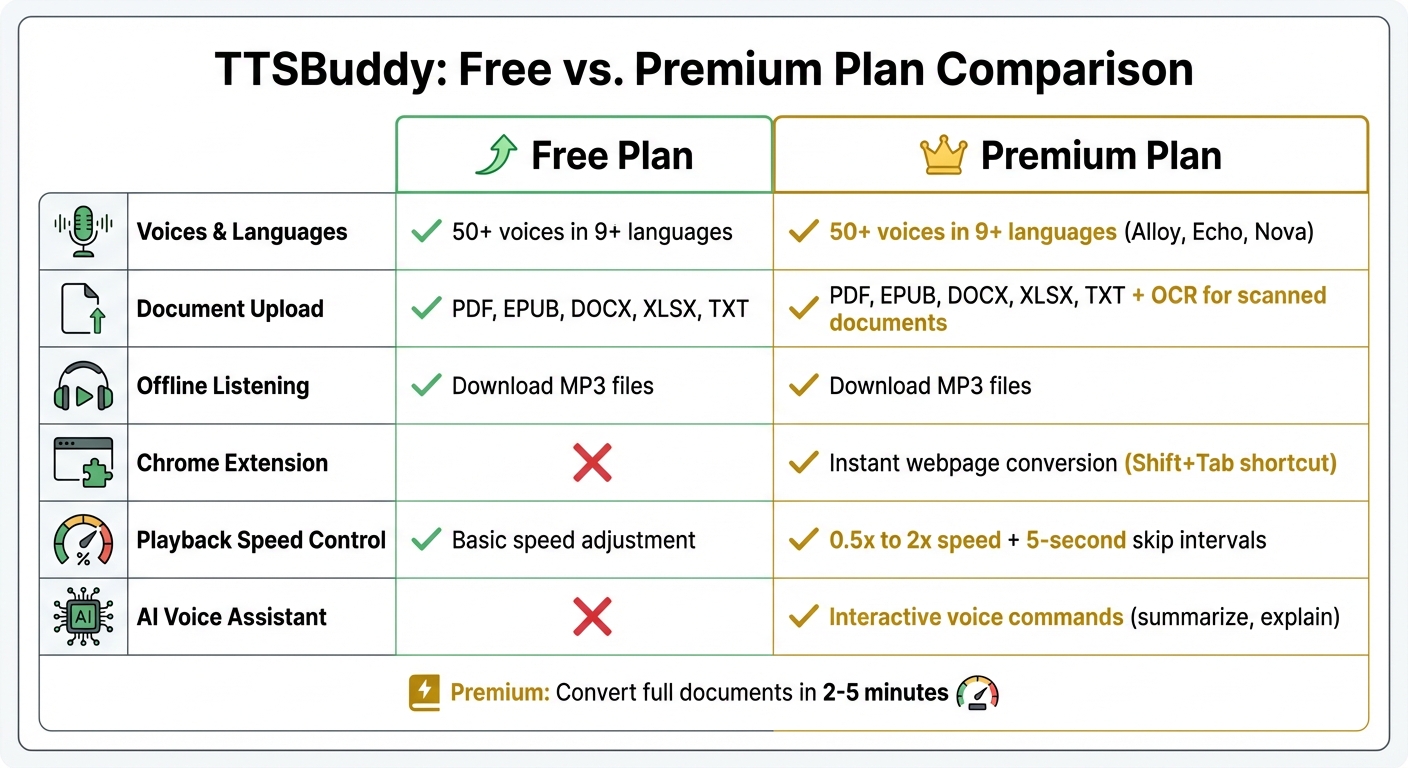
The paid plans take everything great about the free version and add higher limits, API and CLI access, and support options for heavier audio workflows.
300+ Voices and 30+ Language Modes
With TTSBuddy, you gain access to a library of 300+ AI voices in 30+ language modes. These voices include options like Alloy, Echo, and Nova, each designed to fit various content styles - whether you're listening to business reports or storytelling content. This variety makes it easier to find a voice that matches your preference, while also reducing the strain of long listening sessions.
Chrome Extension for Voice-Enabled Browsing
The Chrome extension is a standout feature for busy readers. Once installed, it allows you to convert any webpage into audio instantly with shortcuts like Shift+Tab. It works effortlessly on news sites, social media platforms, newsletters, and even email. You can adjust playback speeds between 0.5x and 2x and skip forward or backward in 5-second intervals, giving you complete control over your listening experience.
What's more, the extension includes an interactive voice AI assistant. This assistant lets you interact with webpages using voice commands like "summarize" or "explain." Instead of reading through lengthy text, you can get the information you need in seconds. Research shows that listening to text-to-speech can boost comprehension and retention, making this tool especially helpful for students and professionals.
Convert Documents to Audio
Document features go beyond web browsing by allowing you to convert large documents into audio files. Upload PDFs, research papers, business reports, or even full-length books, and the platform processes them in just 2-5 minutes. Using OCR technology, it can even extract text from scanned documents or image-based PDFs that are otherwise unreadable. Once converted, the audio can be downloaded as an MP3 file, making it easy to listen offline on your smartphone or smart speaker.
For longer eBooks, the system ensures smooth navigation by analyzing document formatting and creating chapter markers. This feature is perfect for multitasking - whether you're commuting, working out, or handling chores, you can stay productive while listening.
These tools make TTSBuddy's paid plans an excellent choice for anyone looking to simplify their daily routines and maximize efficiency.
How to Add Audio to Your Daily Routine
Find moments in your day when you're busy but can still listen. Instead of thinking about audio as just another task, see it as a way to make the most of otherwise passive moments. Here are some practical ways to weave audio into your daily life.
Listen During Your Morning Commute
Your commute is a perfect opportunity to catch up on content. Whether you're driving, taking public transportation, or walking, you can tune in to news articles, work emails, or industry updates. To avoid interruptions in areas with poor cell service, download your content ahead of time.
Adjusting playback speed can help match your preferred learning pace. As one listener, Mandy Eversole, put it:
"This is a lifesaver - I listen to papers during my commute and on the go!"
Turn Breaks into Learning Opportunities
Short breaks can double as quick learning sessions when paired with audio. Instead of scrolling through social media, use tools like TTSBuddy to listen to research papers, technical blogs, or business reports. The Chrome extension lets you instantly convert any webpage into audio, so you can dive in right away.
If you're walking or eating during your break, take advantage of the one-click note feature. It captures the last two sentences you heard, making it easy to save key points without typing.
Relax with Audio Books
Transform eBooks or long-form content into audio to help you unwind. Listening to an audiobook can turn your downtime into a chance to relax and reflect. For a more soothing experience, slow the playback to 0.5x or 1x, allowing your mind to ease after a busy day.
This approach works particularly well with fiction or lighter reads. You can listen while doing household chores, playing casual games, or winding down before bed. With a variety of voice options available, you can pick one that's pleasant and comfortable for longer listening sessions.
API and CLI Access for Larger Workflows
Need to turn large amounts of text into audio? TTSBuddy's paid plans include API and CLI access for automated text-to-speech conversions, offering a streamlined way to handle audio generation at scale.
The API is built for high-volume tasks, making it ideal for publishers producing audiobooks, developers adding voice capabilities to apps, or businesses automating customer communication. It programmatically transforms large amounts of written content into audio, saving time and effort.
By 2026, modern TTS APIs enable both real-time streaming and batch processing for longer formats like books or research papers. This dual approach means you can opt for instant audio generation for interactive applications or batch processing to efficiently convert entire libraries of documents.
The cost of neural TTS has dropped significantly, with industry averages now around $10 per million characters - a far cry from the $200 per million characters charged by earlier systems. For instance, converting a 100,000-word novel (roughly 500,000 characters) to audio would cost just $5 at current rates. This affordability underscores TTSBuddy's focus on making large-scale audio conversion accessible and budget-friendly.
Ready to explore high-volume audio conversion? Visit the TTSBuddy website to sign up for updates and be among the first to integrate this scalable solution into your workflow.
Conclusion
Audio gives you the power to stay informed and keep learning, even during life's busiest moments. Whether you're commuting, working out, or tackling chores, it turns these everyday activities into opportunities to absorb books, articles, and documents - all without needing your hands or eyes.
With TTSBuddy, making the leap from reading to listening is simple. The platform offers a Free Plan for quick text-to-speech conversion and offline listening. For those looking for more, the Pro and Ultimate plans include higher limits, API and CLI access, a Chrome extension, and document conversion tools for publishers, developers, and businesses with scalable conversion needs.
Whether you prefer listening to process information, require accessibility support, or just need to maximize your time, audio integration provides the kind of multitasking freedom that reading alone can't offer. With TTSBuddy, you can listen anytime, anywhere. Features like speed listening and offline access mean you can take control of your learning pace, no matter where life takes you.
Don't let valuable hours slip away - head over to TTSBuddy and start transforming how you consume content today.