28 posts tagged with "accessibility"

View All Tags

Text-to-Speech CLI: Natural AI Audio

· 10 min read

TTSBuddy CLI is a command-line tool that converts text into natural-sounding audio. Designed for developers, content creators, and accessibility advocates, it supports up to 500,000 characters per request and works on macOS, Linux, and Windows. With 300+ voices across 30+ language modes, it processes audio in 10–30 seconds and includes features like Markdown sanitization, batch processing, and multiple audio formats (MP3, WAV, FLAC, etc.). The free plan provides 120 minutes/month with full API access and no credit card required.

TTS Automation for Developer Workflows

· 12 min read

Text-to-speech (TTS) automation lets you convert text, Markdown files, and technical documentation into natural-sounding audio directly from your terminal. It’s fast, efficient, and helps improve accessibility for over 1 billion people globally. Tools like TTSBuddy CLI simplify this process by handling complex layouts, Markdown elements, and large-scale requests (up to 500,000 characters) with minimal setup.

Multilingual Voice Support: Accessibility Standards

· 16 min read

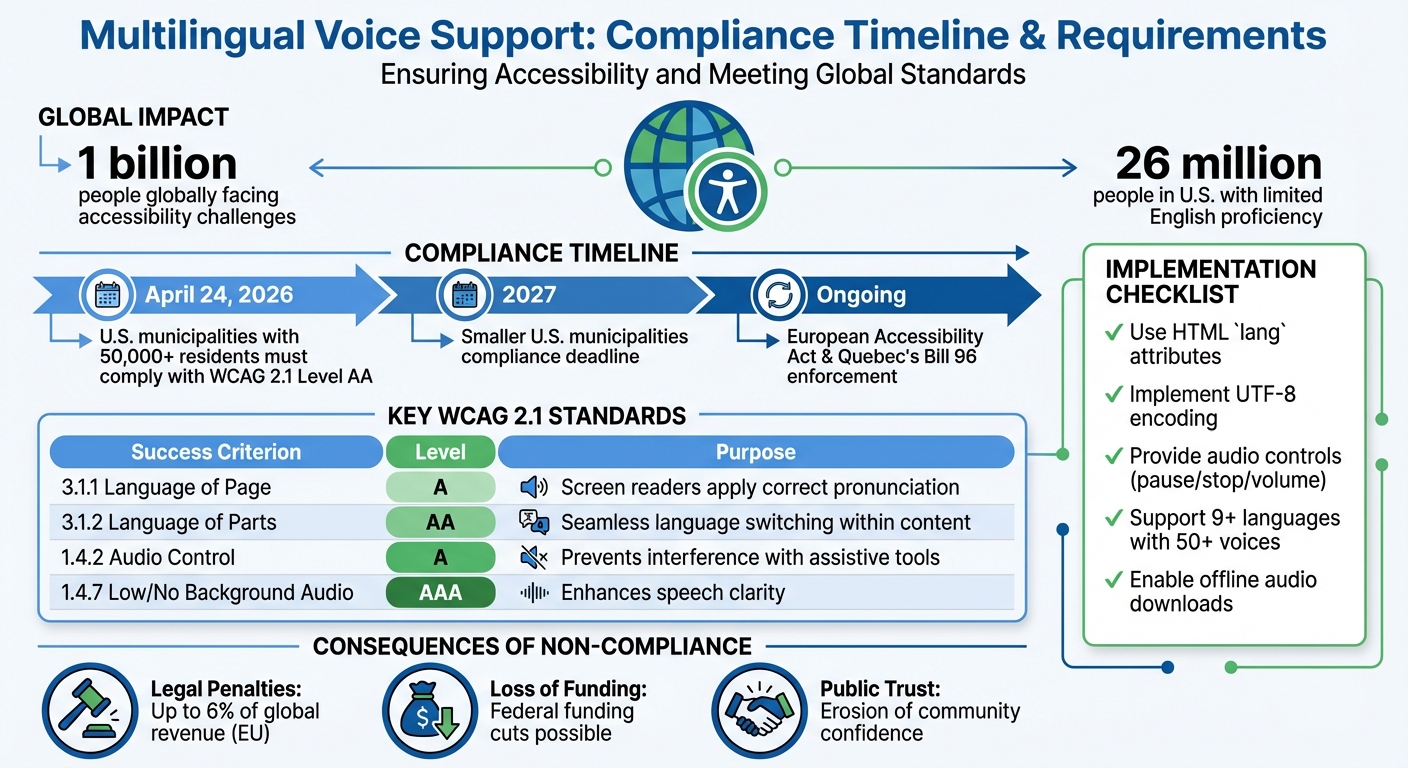
Multilingual voice support ensures people with visual impairments, cognitive disabilities, or language barriers can access information in their preferred language. With over 1 billion people globally facing accessibility challenges, providing accurate and timely audio content is critical. By April 24, 2026, U.S. municipalities with 50,000+ residents must comply with WCAG 2.1 Level AA standards, aligning with global accessibility laws like the European Accessibility Act and Quebec's Bill 96.

Key Takeaways:

  • Compliance Deadlines: Large U.S. municipalities must meet WCAG 2.1 standards by April 2026; smaller ones have until 2027.
  • Core Standards: WCAG 2.1 criteria ensure proper language tagging, audio controls, and clear pronunciation for assistive tools.
  • Implementation: Use HTML lang attributes, UTF-8 encoding, and tools like TTSBuddy to deliver accessible multilingual voice content.
  • Risks of Non-Compliance: Legal penalties, loss of funding, and public trust erosion.

This shift emphasizes that language access is no longer optional - it's a legal and practical requirement for effective communication.

WCAG 2.1 Compliance Deadlines and Key Requirements for Multilingual Voice Support

BonziBuddy to Modern TTS: How a Purple Gorilla Shaped Text-to-Speech History

· 14 min read

BonziBuddy, the infamous purple gorilla from the early 2000s, introduced many to text-to-speech (TTS) technology. While remembered fondly as a meme today, it was riddled with privacy issues, earning it a controversial reputation. Powered by Microsoft's SAPI 4, BonziBuddy's robotic voice was a hallmark of early TTS but lacked the realism of modern systems.

Today, TTS tools like TTSBuddy have transformed the landscape with lifelike voices, better privacy, and practical features. Unlike BonziBuddy's intrusive software, modern tools respect user data and cater to accessibility, offering smoother, more natural speech in multiple languages. BonziBuddy's legacy serves as a quirky reminder of how far TTS has come.

Webpages to Audio: Convert Articles Fast

· 10 min read

Transforming webpages into audio is a simple way to save time, improve accessibility, and make learning more convenient. Whether you're commuting, multitasking, or need an alternative to reading, tools like TTSBuddy allow you to convert articles into high-quality audio files. Here's how it works:

  1. Prepare the Webpage: Remove ads, menus, and sidebars for a cleaner narration experience.
  2. Convert to Markdown: Use TTSBuddy's Chrome extension to extract the main content and format it into Markdown.
  3. Generate Audio: Paste the text into TTSBuddy, choose a voice and language, and convert it into an MP3 file.
  4. Download and Listen: Save the audio for offline use and sync it across devices.

TTSBuddy supports 300+ voices across 30+ language modes and handles up to 500,000 characters per request, making it ideal for long articles or study materials. The Free plan offers 120 minutes of text-to-speech conversion and 30 downloads monthly, with no credit card required.

This tool is especially useful for individuals with ADHD, dyslexia, or visual impairments, as it reduces cognitive strain and allows for flexible learning. Whether you're catching up on news, reviewing reports, or studying, converting webpages into audio has never been easier.